Every Tool You Need to Transform Script Prep
From upload to recording-ready in minutes. Here's everything Speakeazy does for you.
1. AI-Powered Script Analysis
The Core That Powers Everything
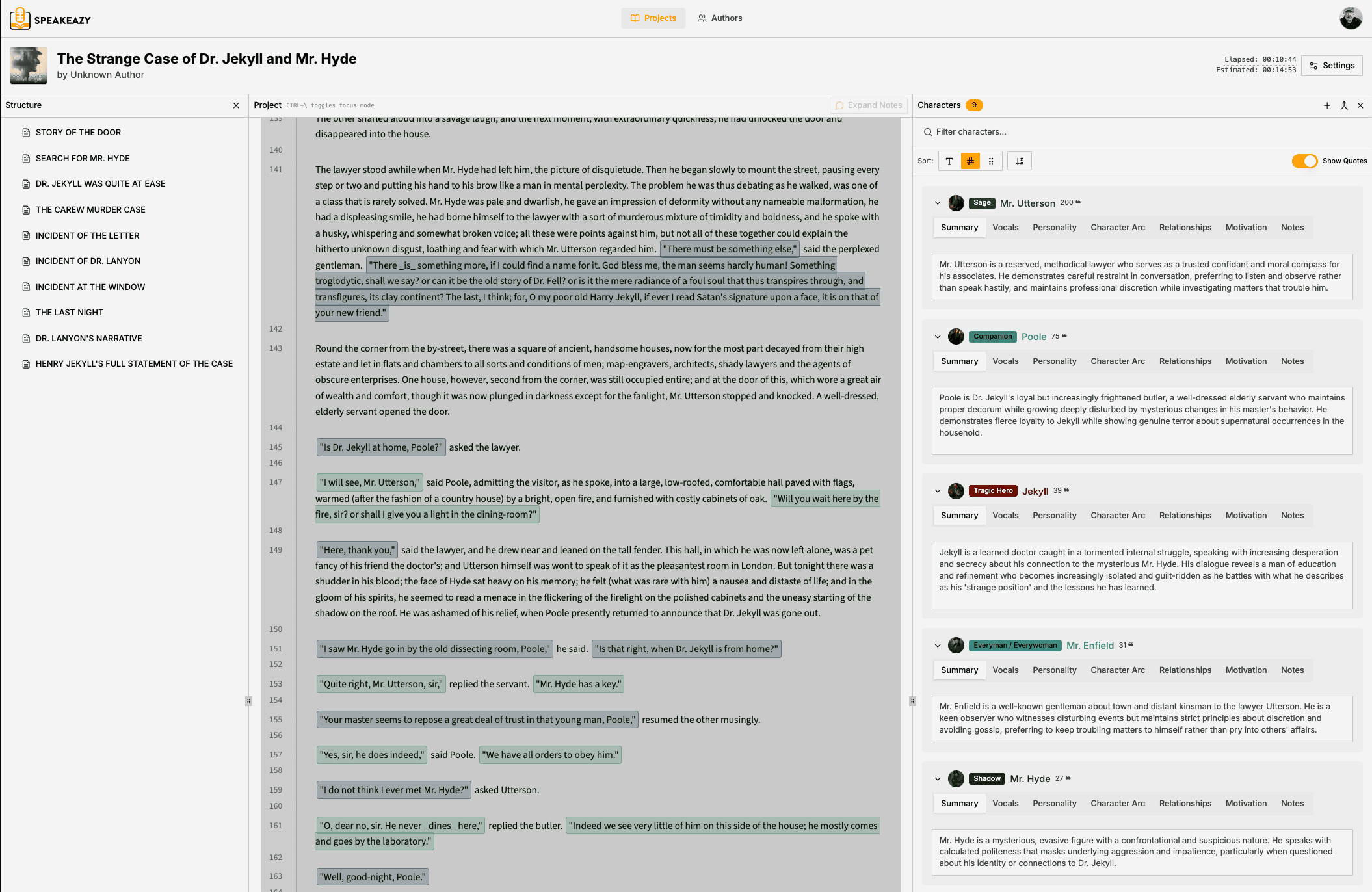
What used to take a full day of manual work now happens automatically. Upload your .DOCX, .TXT or .PDF file, and our AI analyzes every page—identifying characters, attributing dialogue, detecting chapters, and building the organizational structure you need.
Key capabilities:
- Processes manuscripts of any length (analysis time depends on text length)
- Exceptional accuracy in character identification and dialogue attribution
- Handles complex dialogue patterns, nested quotes, and unusual formatting
- See estimated cost and time before starting analysis
- Live progress tracking with ETA during analysis
- Flags uncertain attributions for quick manual review
Estimated time saved: 10-20+ hours per project
2. Automatic Character Identification & Management
Your Cast, Organized Automatically
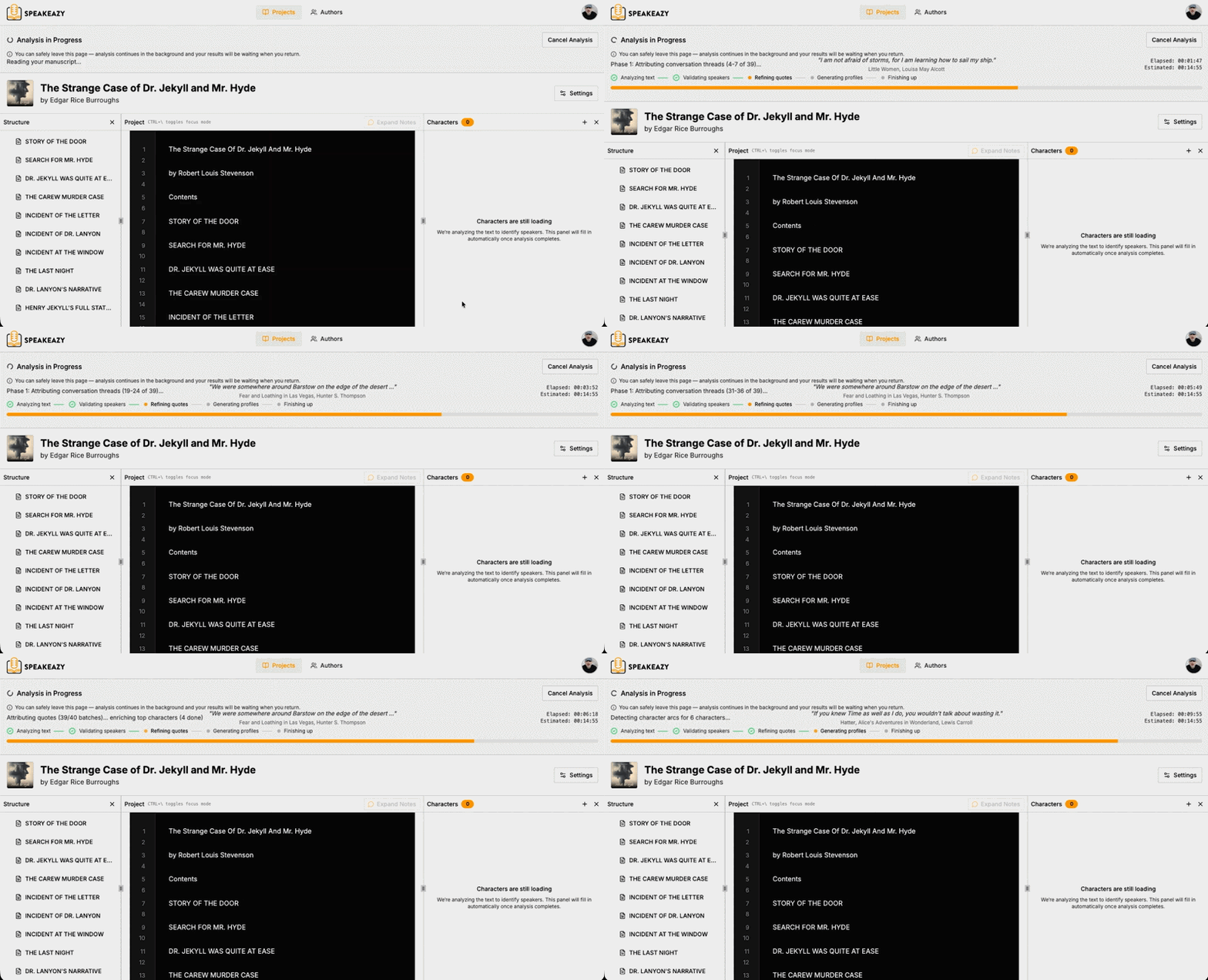
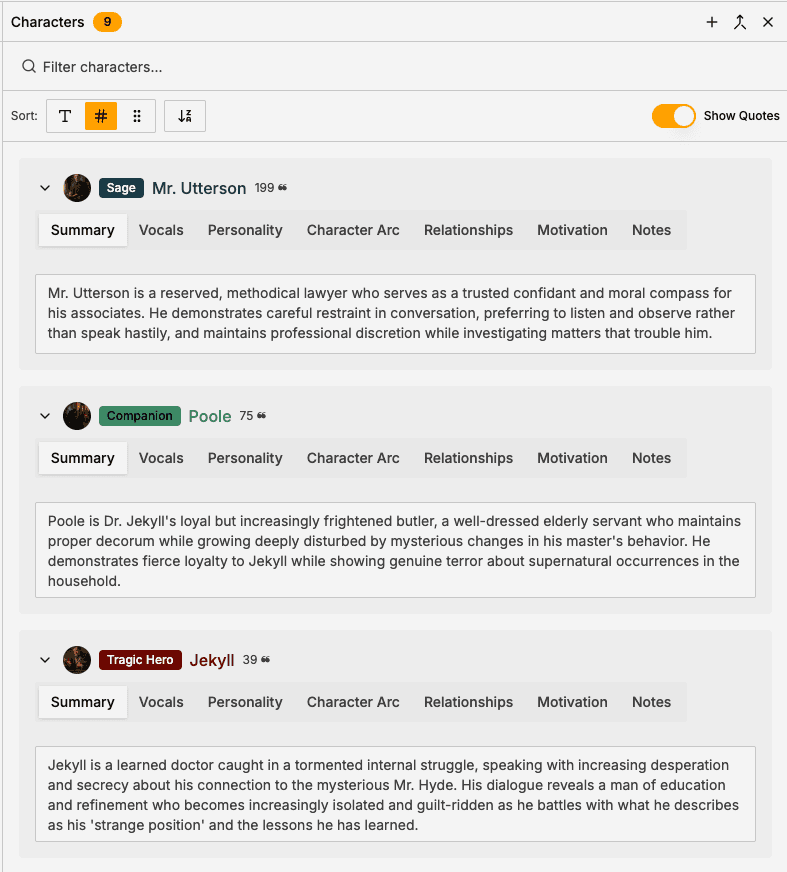
Stop building spreadsheets of character names. Speakeazy creates comprehensive character profiles automatically—including physical descriptions, personality traits, gender, approximate age, and relationships with other characters.
Smart features:
- Intelligent deduplication ("Emma," "Emma Woodhouse," and "Miss Woodhouse" = one character)
- Context-aware identification (recognizes speakers even without explicit attribution tags)
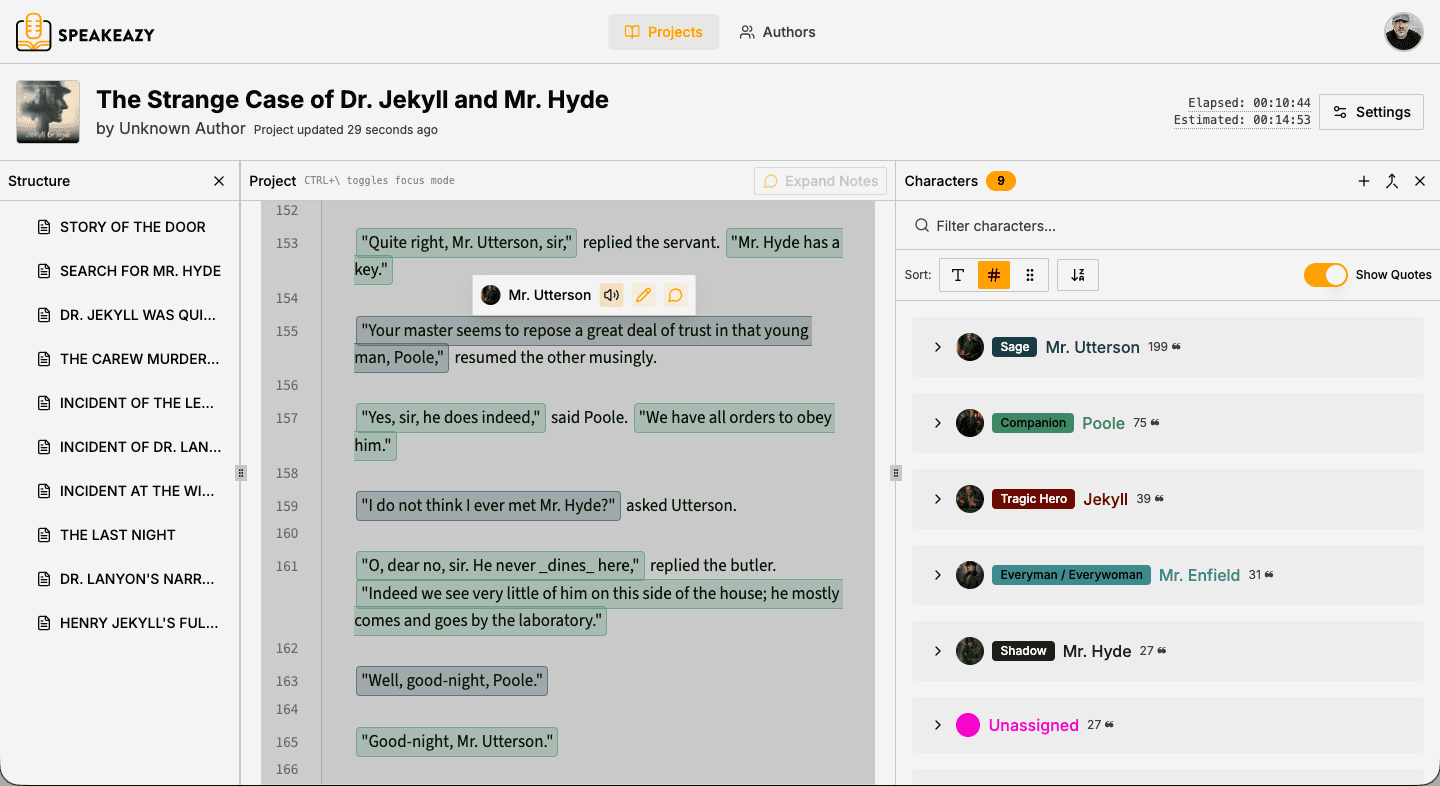
- Unique color assignment for visual distinction
- Editable profiles for your own notes and voice decisions
Time saved: Eliminates hours of manual character tracking
3. Automatic Quote Attribution
Know Who's Speaking. Always.
The most time-consuming part of script prep—figuring out who says what—is now automatic. Our AI analyzes context before and after every quote to accurately attribute dialogue, even in complex conversations.
How it works:
- Uses NLP (natural language processing) and AI (artificial intelligence) to analyze quote context and speaker
- Tracks conversation flow to maintain accuracy in back-and-forth exchanges
Estimated time saved: 10-20+ hours per book
4. Visual Dialogue Highlighting
Your Script, Color-Coded
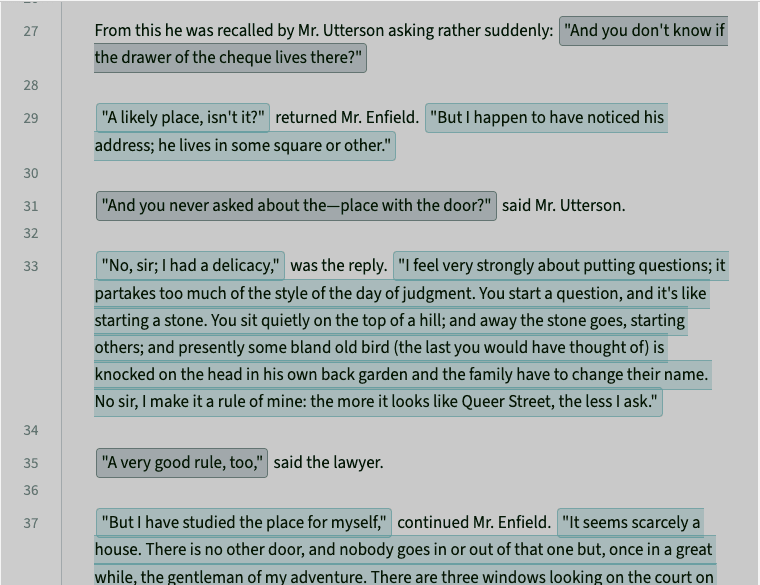
Every line of dialogue is highlighted with the speaking character's assigned color. During recording sessions, identify the speaker instantly without breaking your concentration or flow.
Benefits:
- Immediate visual recognition during performance
- No need to reference external character lists
- Customizable colors for accessibility preferences
- Reduces cognitive load during long sessions
Time saved: Eliminates constant back-referencing during recording
5. Instant Chapter Navigation
Jump to Any Scene, Instantly
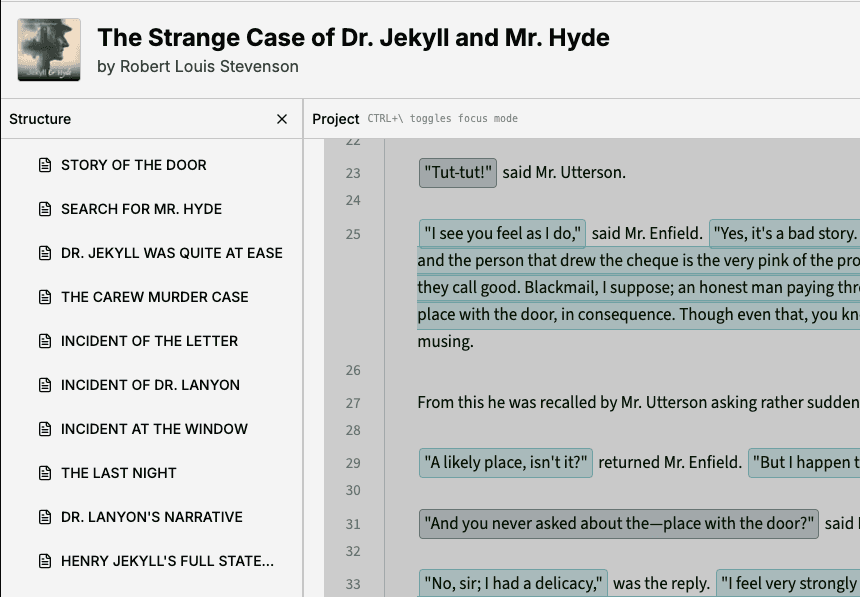
Speakeazy automatically detects your manuscript's structure—books, volumes, parts, chapters, and scenes—and creates a clickable navigation outline. No more scrolling through 400 pages to find that one scene you need to re-record.
Navigation features:
- Auto-detected structural hierarchy
- One-click jump to any section
- Collapsible outline for easy browsing
- Perfect for retakes and pickup sessions
Time saved: Minutes per session that add up to hours
6. Voice Recording Tools
Build Your Character Voice Library
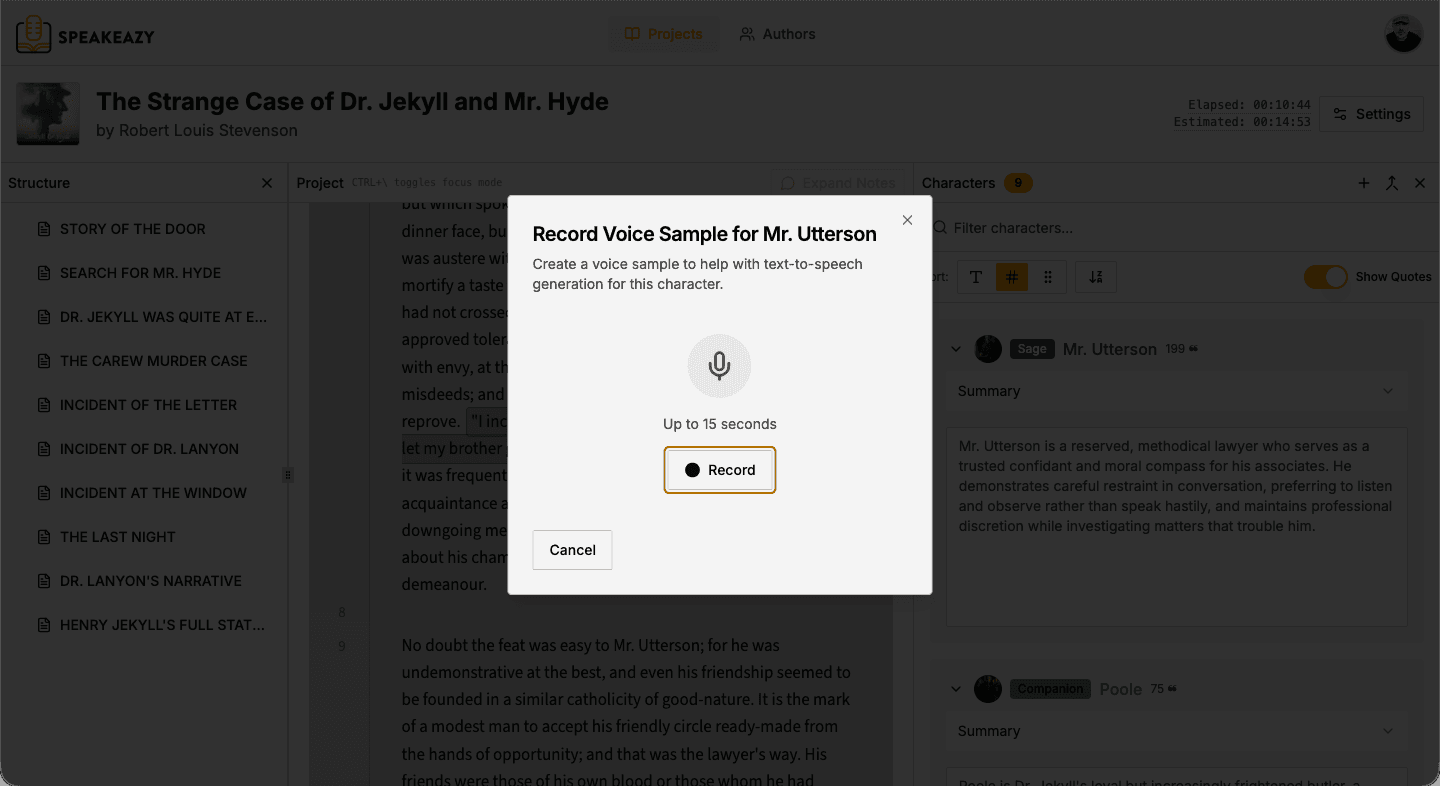
Record and save voice samples for each character directly in Speakeazy. Three weeks into a project, instantly recall exactly how you voiced the elderly shopkeeper in chapter three—without digging through hours of raw recordings.
Recording features:
- Easy recording attached to character profiles
- Instant playback during recording sessions
- Notes field for voice descriptions
Time saved: No more re-listening to previous sessions for voice matching
7. Deep Character Analysis
PRO FEATURE — Understand Characters Like Never Before
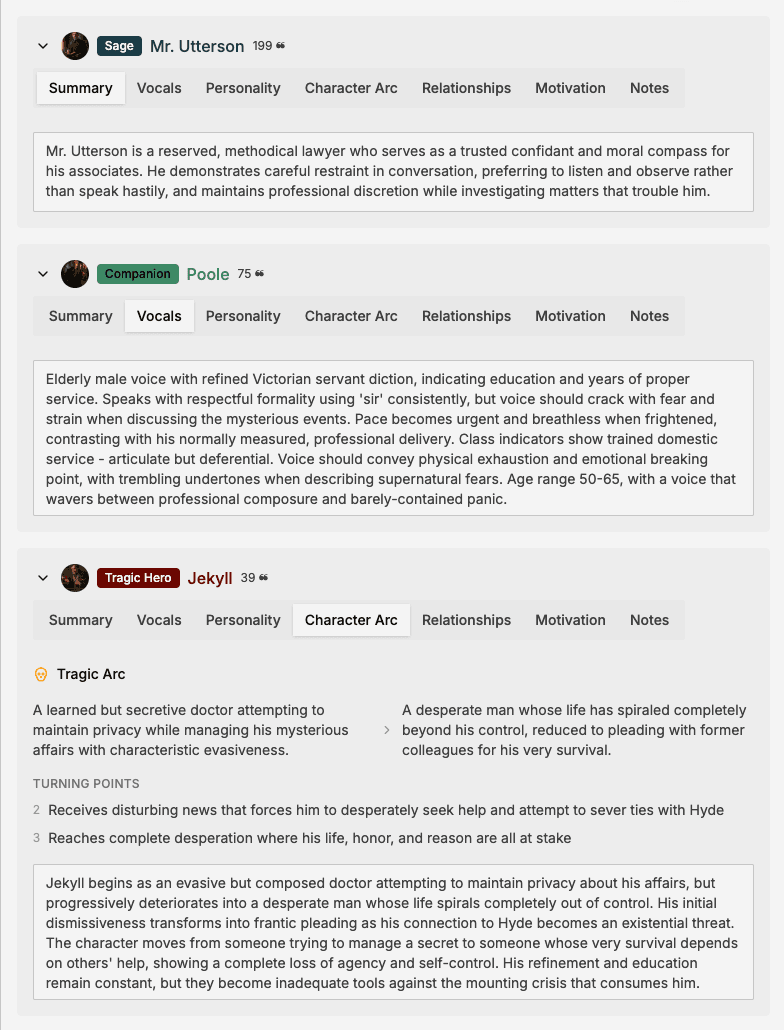
Go beyond identification to deep character understanding. Our AI analyzes each character's arc, relationships, motivations, speaking patterns, and emotional journey—insights that would take hours of manual analysis.
Analysis includes:
- Character summaries
- Suggested vocal characteristics
- Personality traits
- Character arc
- Relationships with other characters
- Motivations
Benefit: Better character understanding leads to more authentic, nuanced performances
8. Inline Script Editing
Fix Issues Without Leaving Your Workflow
Spot a typo? Need to adjust formatting? Make corrections directly in Speakeazy without switching applications or re-uploading your script.
Editing capabilities:
- Direct text editing
- Character attribution corrections
- Note additions
- Formatting adjustments
Time saved: Seamless corrections without workflow interruption
9. Author & Project Organization
All Your Work, Beautifully Organized
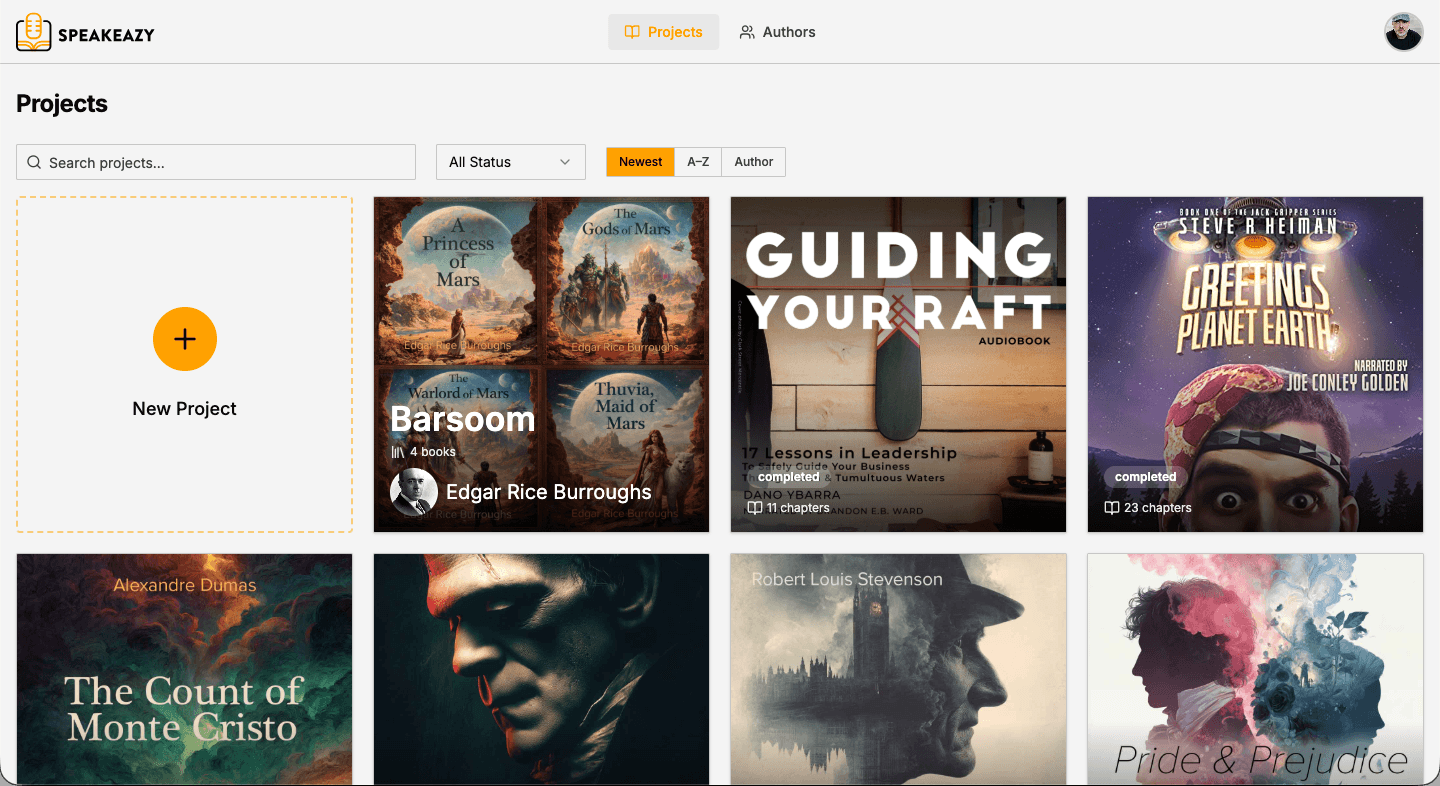
Working on multiple projects? Speakeazy keeps everything organized by author, with custom thumbnails (or upload your own), metadata, and easy categorization. Your project library, always at your fingertips.
Organization features:
- Author-based project grouping
- Custom thumbnails (or upload your covers)
- Drag-and-drop project reordering
- Word (DOCX), PDF and TXT file import, with Word formatting preserved
Time saved: Efficient project management for prolific professionals
10. Secure Cloud Storage
Access Your Projects Anywhere
Your scripts, character profiles, and voice samples are securely stored in the cloud and accessible from any device. Studio, home office, or on location—your work travels with you.
Cloud benefits:
- Automatic backup and sync
- Access from any device
- No file management headaches
- Secure, encrypted storage
Benefit: Peace of mind and flexibility
11. Customizable Reading Experience
Your Perfect Working Environment
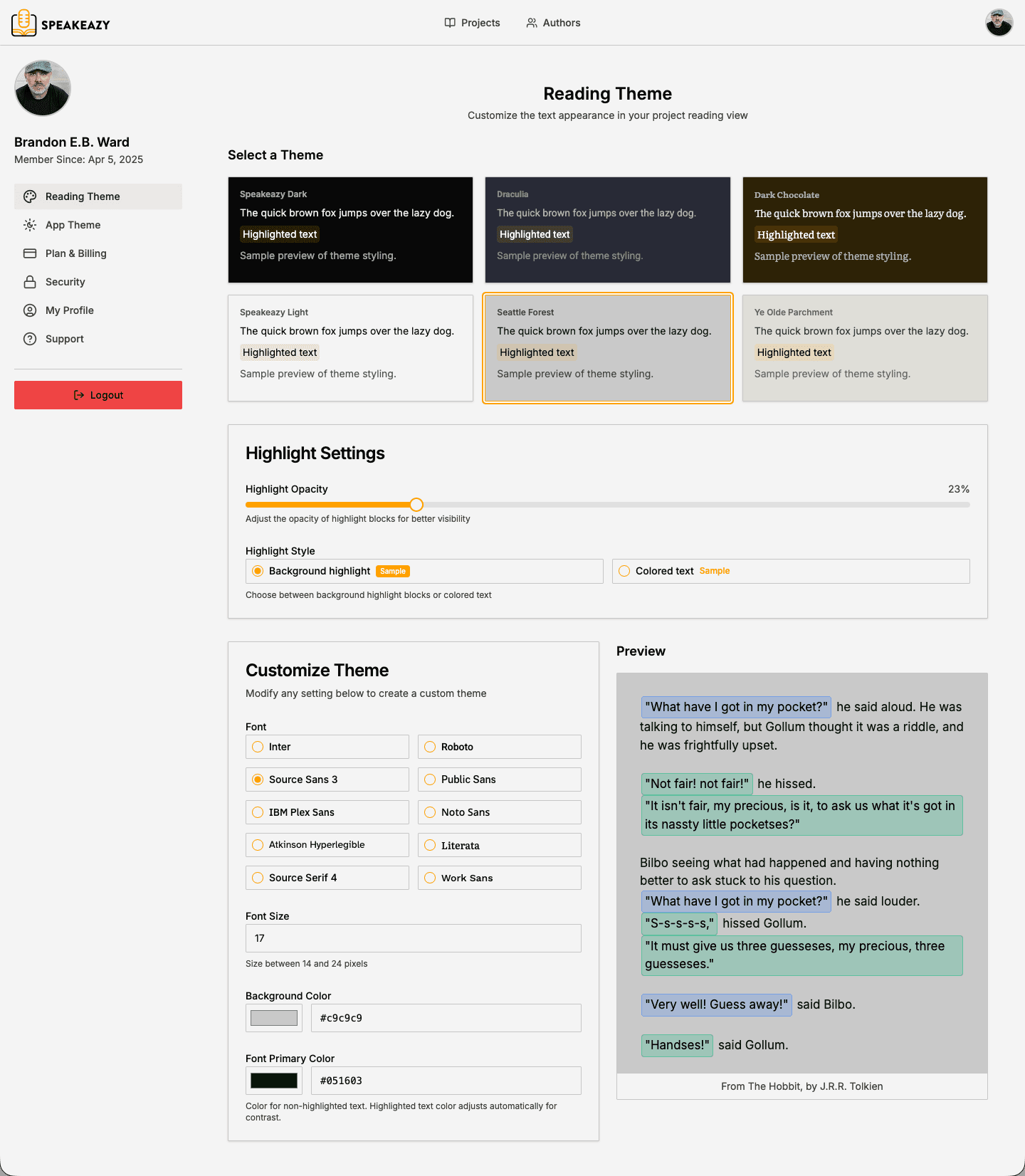
Long recording sessions demand comfort. Customize text size, fonts, color themes, and display preferences to reduce eye strain and create your ideal reading environment.
Customization options:
- Adjustable text size and line spacing
- Multiple font options
- Choose from multiple color themes
Benefit: Reduced eye strain during marathon sessions
12. Book Series Management
PRO FEATURE — Characters That Span Volumes
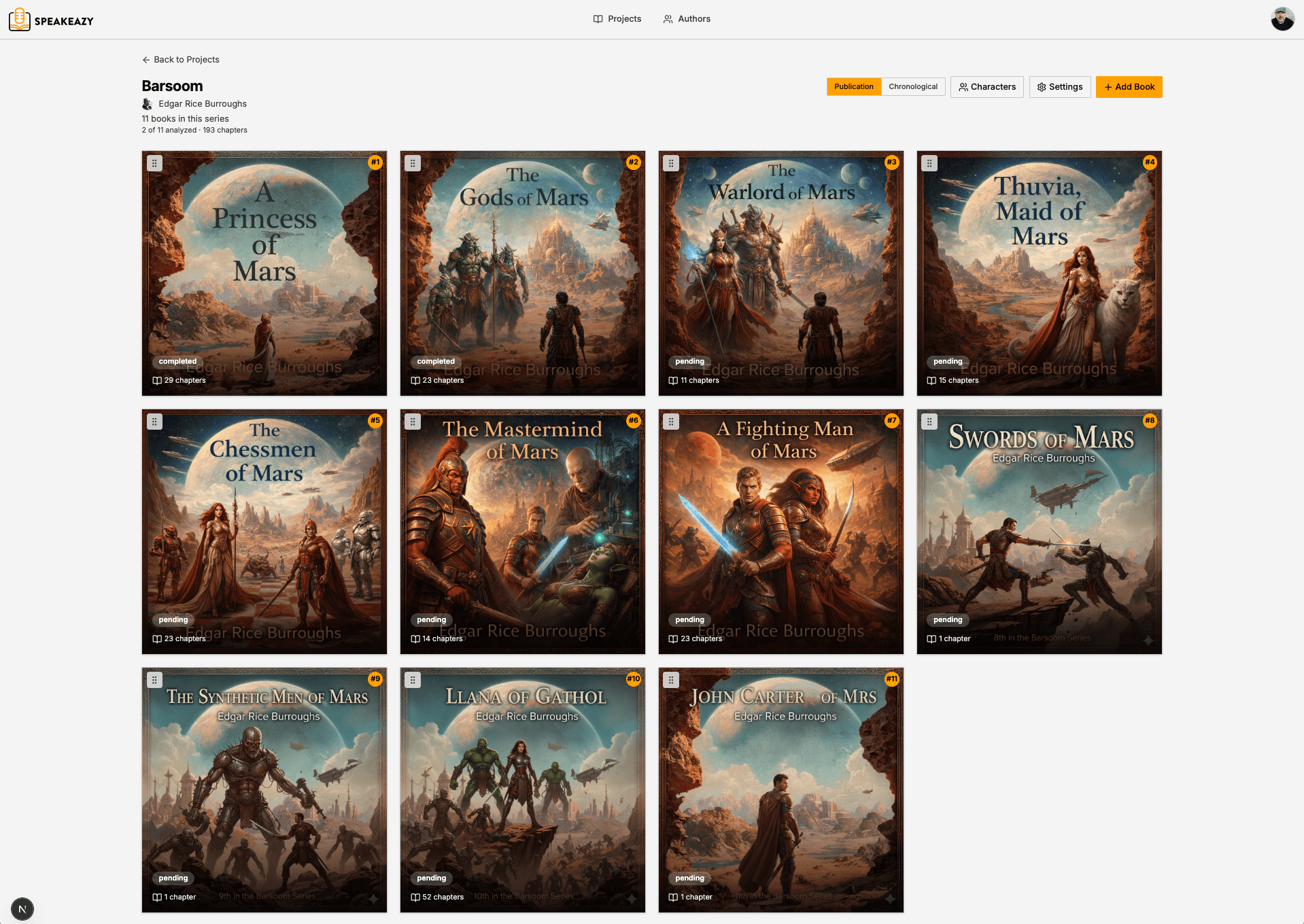
Narrating a series? Group books together and track characters across volumes. Maintain voice consistency from book one through the finale without flipping between separate projects.
Series features:
- Group related books into a series
- Track recurring characters across volumes
- Maintain voice consistency throughout a series
- Organized series library for easy access
Benefit: Voice consistency across multi-book projects

See How Speakeazy Fits Your Workflow
For Audiobook Narrators
Upload your manuscript → Review auto-generated character profiles → Record voice samples → Navigate chapters during recording → Maintain consistency across 10+ hours of narration.
For Voice Actors
Import your script → Instantly see which lines are yours → Access character analysis for deeper understanding → Record with confidence knowing exactly who's speaking.
For Authors & Editors
Analyze your dialogue-heavy manuscript → Ensure consistent character voices → Prepare narration-ready files → Hand off organized, attributed scripts to your narrator.
Built for Voice Professionals
Estimated hours saved per audiobook
What used to take a full day of prep now takes minutes
Estimated dialogue attribution accuracy
Based on internal testing across a variety of manuscripts
Cloud-Based Processing
Set it and forget it—analyze while you sleep, record when you're ready
See Speakeazy in Action
Watch: See a full chapter analyzed and color-coded in under 2 minutes
Ready to Transform Your Workflow?
Start your 14-day free trial.
Then $9/month or $72/year depending on the billing period you choose, renewing automatically until you cancel. Cancel any time from your account settings.
Join the next wave of voice professionals transforming their workflow.